
How to Make an AI Short Drama From One Sentence
A step-by-step tutorial: turn one premise into a vertical AI short drama with consistent characters, scripted scenes, voices, music and a rendered episode.
Tutorials · By ShortDrama Studio Editorial Team · Published · 4 min read
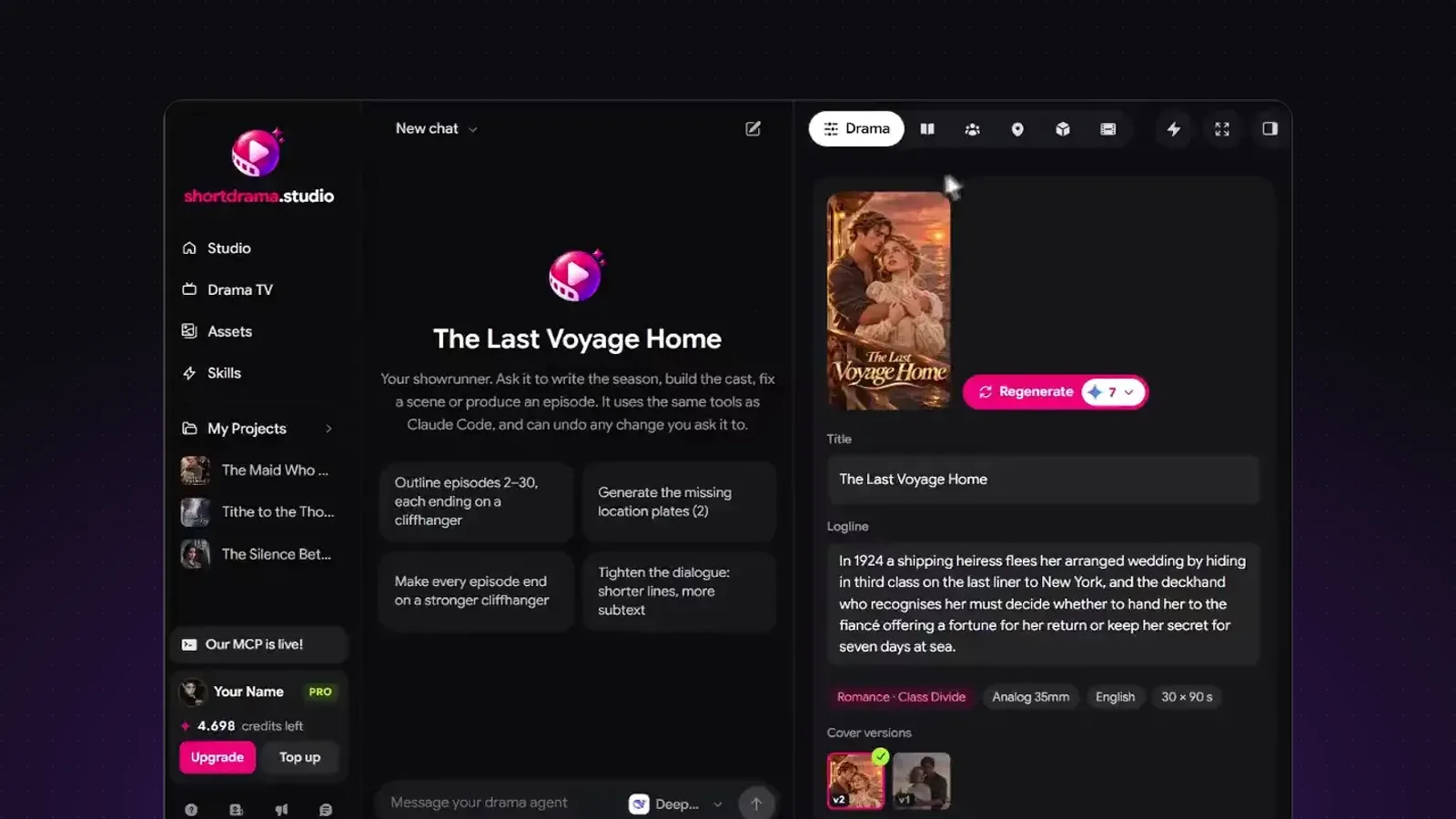
You can make an AI short drama from one sentence by giving an AI agent a premise and letting it work in order: it writes the series, casts consistent characters, designs the places, scripts each episode scene by scene, films every scene as a 6–15 second clip, then renders the episode with voices, music and subtitles. In ShortDrama Studio that whole path runs in one chat.
Key takeaways
- Start with one line that names a person, what they want and what stands in the way. The agent builds everything else from it.
- Let the story come first: bible, cast, places and episode outline cost few credits, so fix them before any picture is made.
- Every scene is one clip of 6 to 15 seconds; a one-minute episode is about six scenes.
- On the standard video model, one finished minute uses about 700 credits, the monthly allowance of the Plus plan.
This tutorial walks through each step with what to check before you move on. If you are new to the format, read what an AI short drama is first; it covers episode length, hooks and genres.
What do you need before you start?
You need a free account and one sentence. No script, no software, no camera. A good premise names a character, a want and an obstacle, in that order:
A night-shift nurse discovers the billionaire patient she saved is the husband who faked his death ten years ago.
That one line already holds a genre (revenge romance), a hook (a dead husband alive) and a question the episodes can answer. Our list of short drama ideas has a hundred more if you want a starting point. Pick a language for the dialogue and, for a film or ad, the frame (vertical 9:16 is the default for drama series).
How does the agent turn a sentence into a series?
Type the premise on the home page and press Create. The studio opens on a chat with the agent and a side panel that follows what it writes. In this order it fills in:
- The drama: title, logline, genre, visual style, age rating and the number of episodes.
- The bible: synopsis, the rules of the world, the season arc and how the characters are tied together.
- The cast: each character's age, look, outfits ("looks"), voice and inner story (want, wound, flaw, arc).
- Places and props: every location with its times of day, and the objects the plot turns on.
- The episode outline: one line per episode, each ending on a cliffhanger.
Writing this costs few credits, so this is the moment to steer. Open any tab and change a field, or tell the agent in the chat: "make the husband colder in episode 1" or "cut the season to 12 episodes". It rewrites only what you name.
How do you keep characters looking the same in every scene?
Consistency comes from reference pictures. Before any scene is filmed, the studio makes a portrait of each character in each look and a plate of each location. Every scene video is generated from those references, so the nurse in episode 9 has the face she had in episode 1.
Check the portraits carefully: they are the cheapest place to fix a face, hair or outfit. Regenerate a portrait until it is right, then pick it as the take in use; the version row under the picture keeps every earlier one.
How is each scene written and filmed?
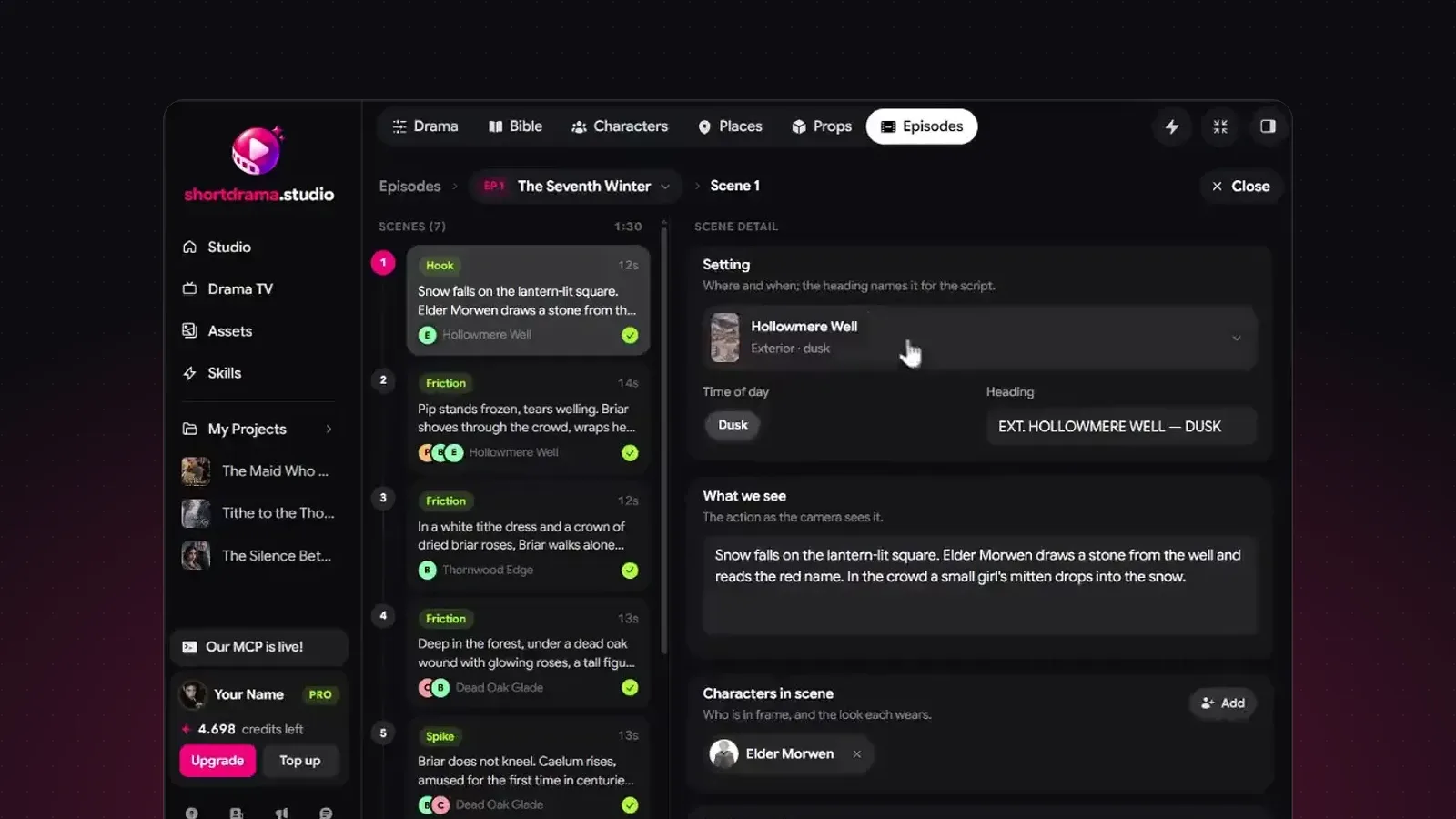
Ask the agent to script episode 1. Each scene gets a place and time of day, the characters in it with their look, what the camera sees, the dialogue and a beat (cold open, tension, climax or cliffhanger). Scenes last 6 to 15 seconds, the length one video clip can hold, so a one-minute episode is about six scenes.
Then the agent films them. The video model speaks the dialogue itself, in the drama's language, and scenes in the same place can continue from the scene before so the light, wardrobe and positions carry over. Every Generate button shows its credit price before you press it, and the agent asks before any step above your approval threshold.
How do you render and export the episode?
When every scene of an episode has its video, press Render episode. The render joins the clips, adds music composed to the episode's beats, mixes the voices and burns in subtitles. A render costs 5 credits for an episode up to 3 minutes. You get an MP4 plus SRT and VTT subtitle files, ready for TikTok, YouTube Shorts or Reels.
Each render is kept as a version, so you can change a scene, render again and compare. The guide on how to make an AI short drama goes deeper into pacing and hooks for episode 1.
How many credits does one episode take?
On the standard video model, a 10-second scene costs about 84 credits. A one-minute episode, about six scenes plus music and the render, comes to roughly 700 credits: the monthly allowance of the Plus plan at $10 a month. The full price list is on the pricing page, and our post on what an AI short drama costs works through a whole season.
FAQ
Do I need to write a script?
No. One sentence is enough: the agent writes the bible, the characters, the outline and every scene. You can also paste or upload your own story as text, and the agent works from it instead.
Can I edit what the agent writes?
Yes. Every field in the side panel is editable and saves itself. You can also ask in the chat for a change to one character, one scene or the whole season, and the agent rewrites only that part.
How long can an episode be?
Most vertical dramas run one to three minutes an episode. Each scene is 6 to 15 seconds, so an episode is as long as the scenes you give it.
Which languages can the characters speak?
The dialogue is written and spoken in the language you pick for the drama, and the subtitles follow it. The studio itself is available in 15 interface languages.
Can I use the episodes commercially?
Paid plans include commercial use. Read the Creative Licensing Agreement for what that covers.
Ready to try it? Start your drama free with one sentence. For the format itself, see the market overview by Vitrina.
Tags: tutorial, ai short drama, getting started